
FList
Spotlight
Manage sessions
With the newly added features of drag and drop and move to, session management has become more convenient and easy.
OneKey
OneKey enables automatic login by using the preset login settings. When a large number of servers share the same login settings, this feature can greatly facilitate their management. Especially when login settings change, it is easy to make all servers switch to the new login settings by simply modifying the corresponding OneKey.
OneKey supports:
Highlight Text
Highlight Text supports marking text with specified font color, background color, line type, and line color, which makes it very convenient to highlight the output text that needs attention.
Rainbow Brackets
Rainbow Brackets supports assigning a unique color to each pair of opening and closing brackets to make it very easy to identify them and their scope.
Trigger
A trigger is an action that is automatically executed when the output received from a server matches specified text or regular expressions. Triggers help automate and streamline workflows in the terminal, increasing efficiency and reducing the need for manual intervention.
Trigger types:
- Custom Link
- Custom Menu
- Event: Connection And Disconnection
- Highlight Text
- Play Sound
- Run Command
- Send Text
- Show Tooltip
Build-in Triggers:
Sync Terminal Folder
Sync Terminal Folder supports syncing the current working directory between filer and terminal. When you change directories in the terminal, filer should follow automatically and optionally, vice versa, the working directory of the filer can be quickly copied to the terminal.
Sync Terminal Folder supports:
- Copy directory path from filer to terminal.
- Manually sync terminal folder.
- Automatically sync terminal folder.
Note that not all local or remote systems support Sync Terminal Folder.
Sysmon
Sysmon allows you to monitor the usage of system resources such as the time, uptime, CPU, memory, network, etc. of the local machine or remote server.
Sysmon supports:
- Linux (SSH, Shell)
- macOS (SSH, Shell)
- Cmd
- PowerShell
- Windows Subsystem for Linux
Performance
Terminal
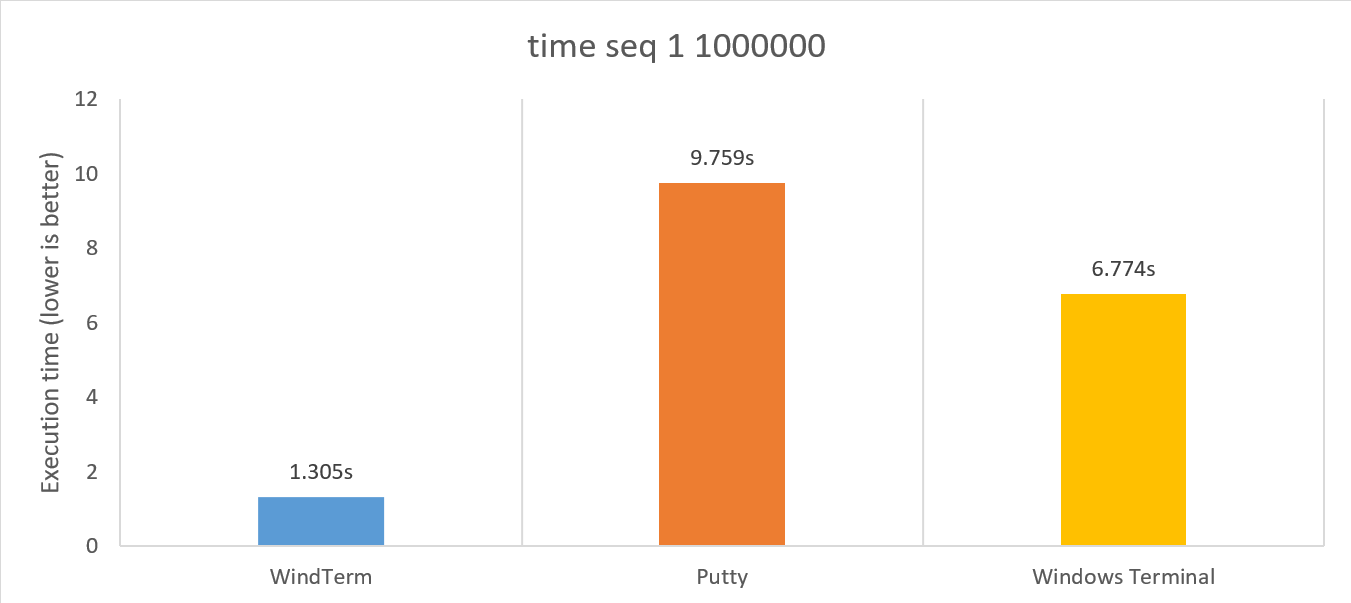
The redesigned Log module, combined with further code optimization, allows WindTerm to run several times faster than other terminals, regardless of whether logging is enabled or not.
Sftp Transfer
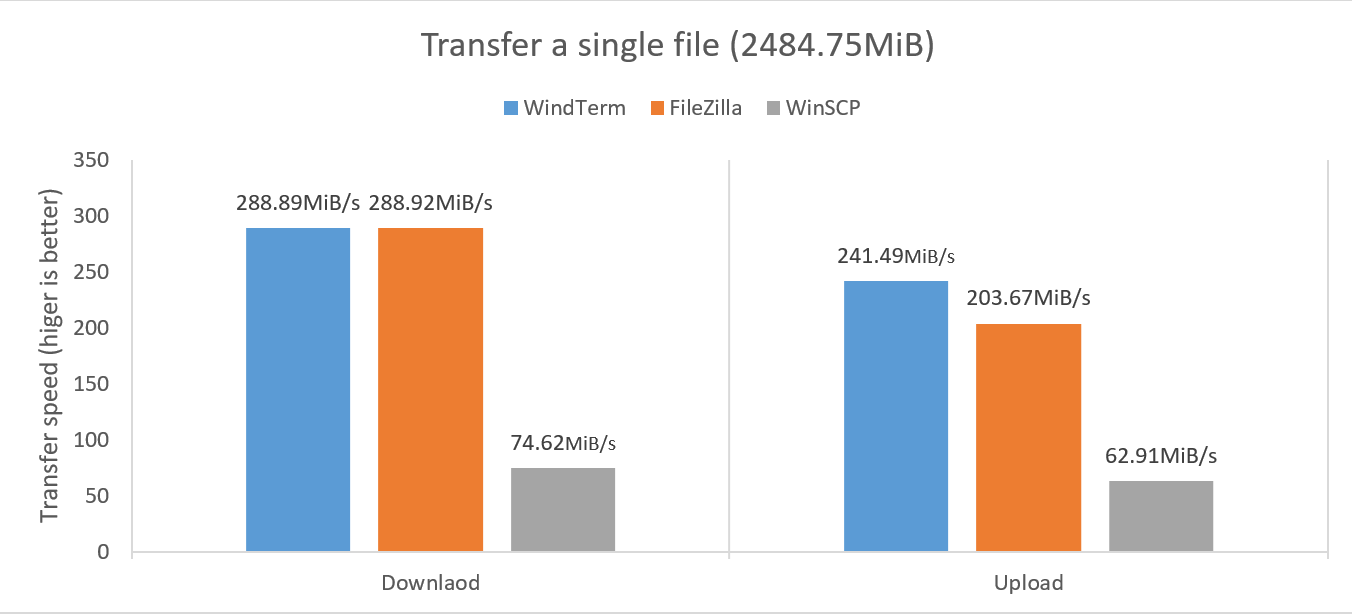
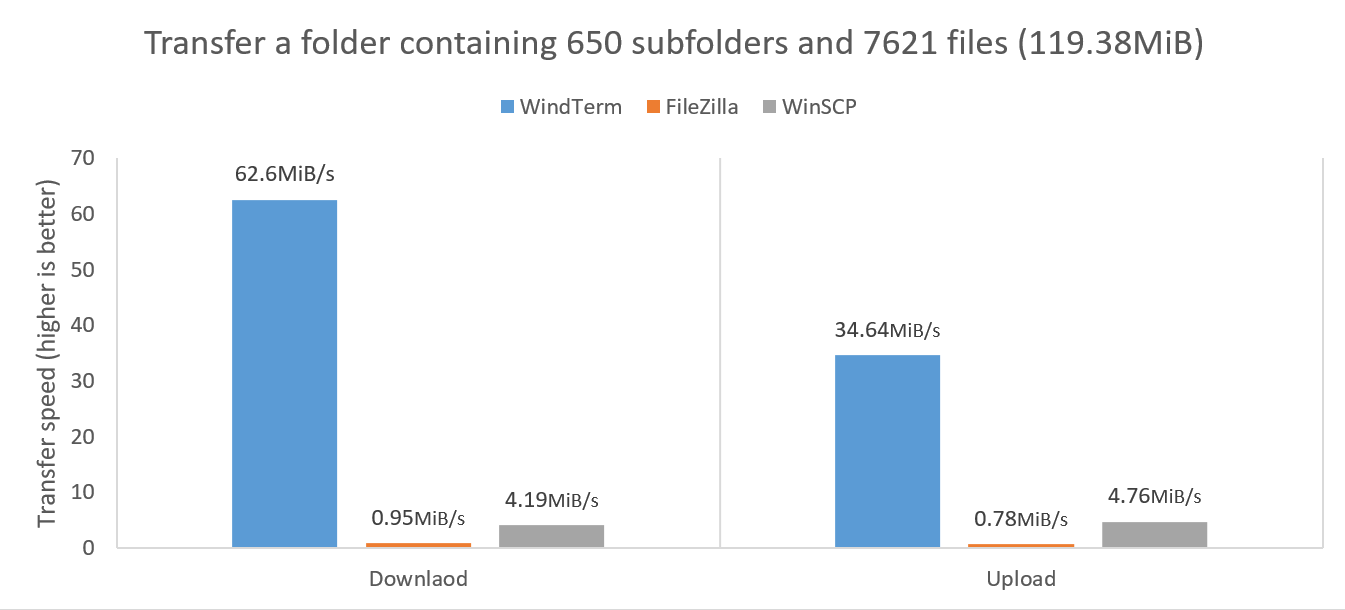
The redesigned Sftp Transfer module enables the fastest possible transfer speeds for both large files and a large number of small files. In some cases, the speed can even be up to ten times faster than professional tools.
Local Transfer
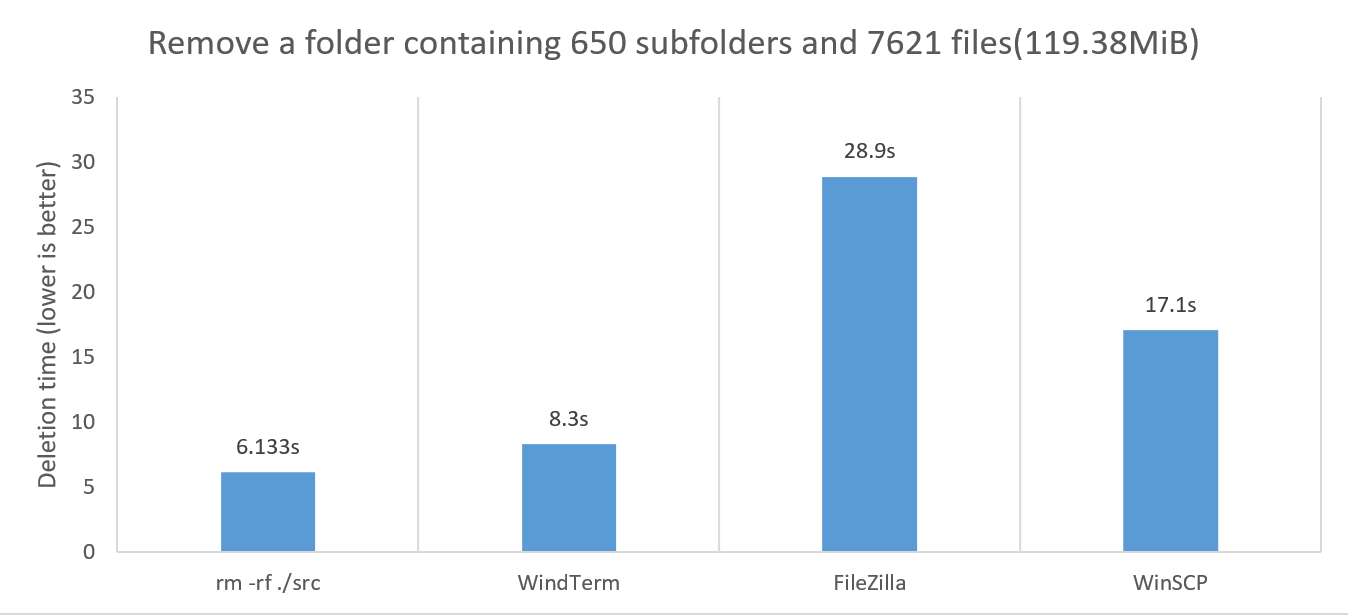
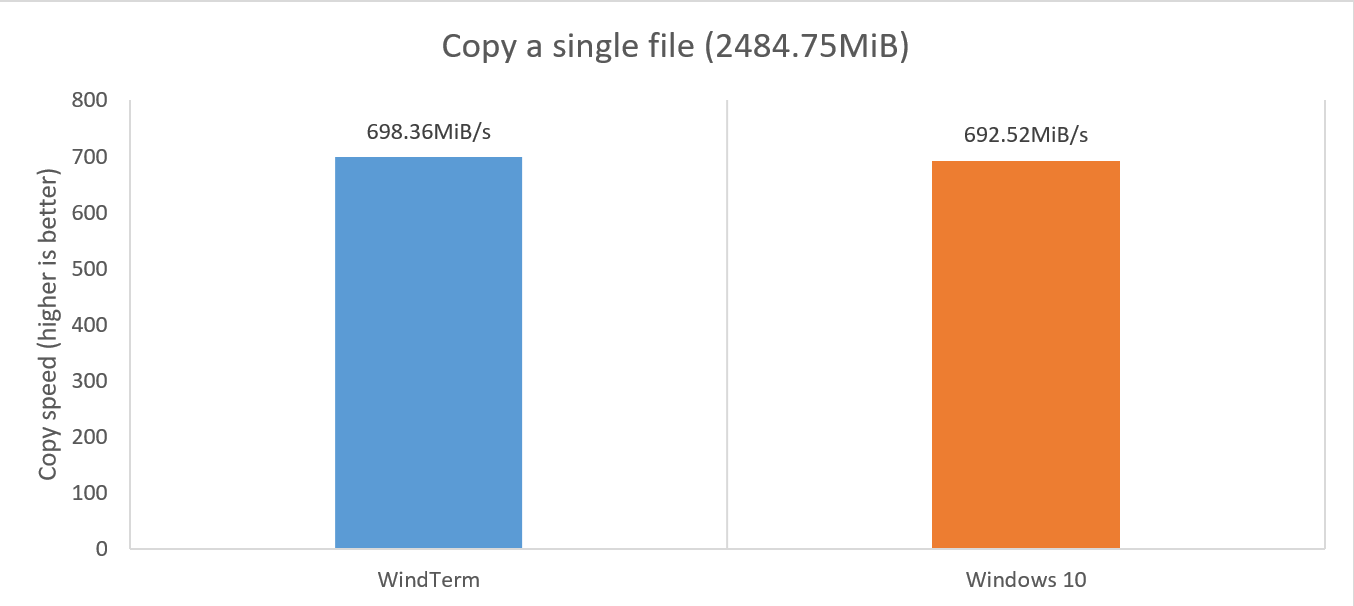
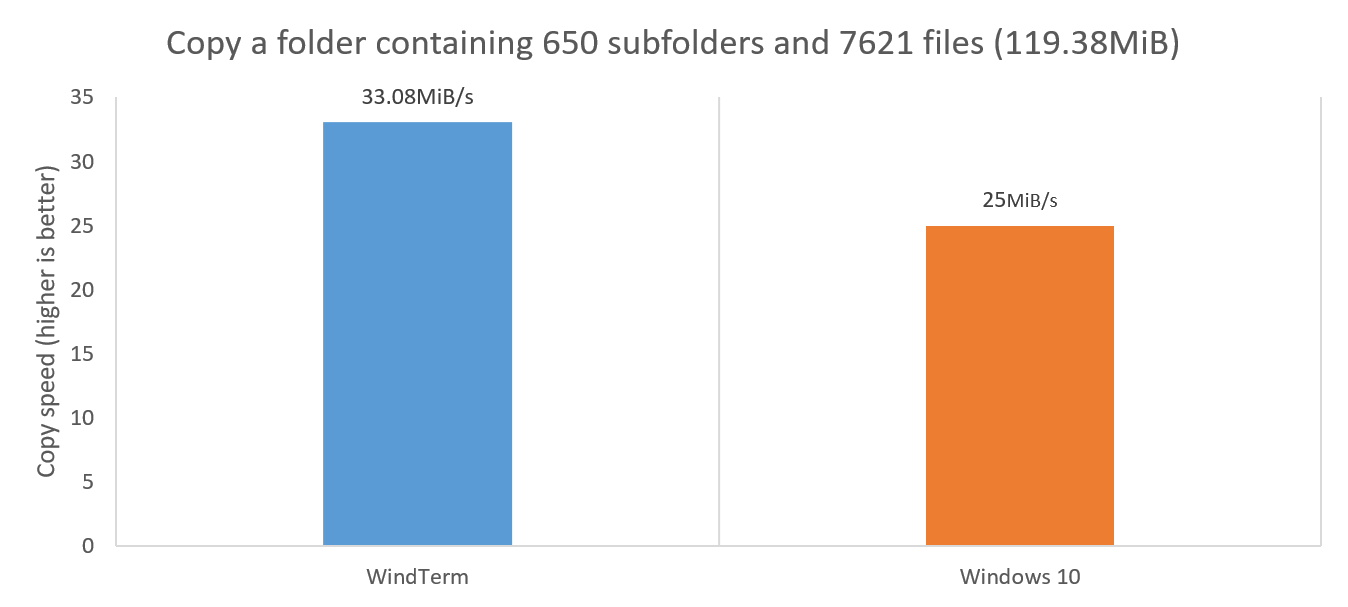
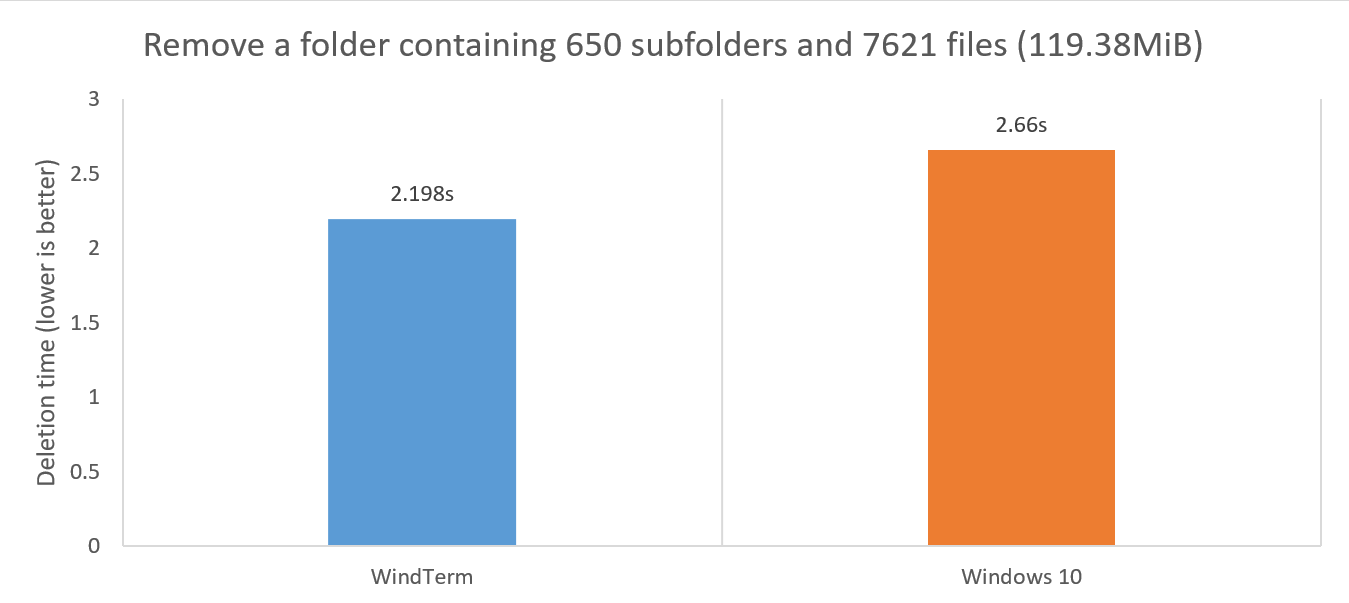
The redesigned Local Transfer module allows for file copying and deletion at speeds that can rival or even surpass those of the system itself.
Usage:
Windows
| Version | Architecture | Operating Systems |
|---|---|---|
| WindTerm_2.6.0_Prerelease_3_Windows_Portable_x86_64 | x86_64 | Windows 7, Windows 8, Windows 10, Windows 11 |
Upgrade
Versions before Version 2.4.0
- Start
WindTermand select theprofiles directoryand quit. - Replace the new
.wind/profilesfolder with the oldprofilesfolder. - Restart
WindTermand all the sessions and configuration will be restored.
Versions after Version 2.4.0
- Start
WindTermand select theprofiles directorycontaining the old.windfolder. - It is recommended to choose the
Home Directoryto facilitate subsequent upgrades.
If the .wind folder needs to be moved to another system:
- Quit
WindTerm. - Replace the new
.windfolder with the old.windfolder. - Restart
WindTermand all the sessions and configuration will be restored.
The .wind folder is cross-platform.
Known Issues:
- [ZMODEM] Only support file names contains ASCII characters in Windows, otherwise the file name of the transfered file will be garbled after transmission, but it does not affect the correctness of the file content. Linux and MacOS version does not have this problem.
Changes in Version 2.6.0 Prerelease 10 (2023-1-17):
Features:
- [SESSION] When no node is selected, the right-click menu adds the menu item
New Session. #2083
Bugs:
- [SESSION] Unable to connect to the server through the
Jump Serverproxy, the error message isThe proxy type is invalid for this operation. This was introduced in2.6.0 Prelease 5. #2033 #2059 #2079
Changes in Version 2.6.0 Prerelease 9 (2023-1-16):
Improvement:
- [GUI] Add tooltip
Requires server supportto slip buttonsSftpandSysmonin thesession settingsdialog. - [SESSION] Increase the session
connection timeoutto20seconds to better accommodate poor network conditions. #2076
Bugs:
- [SESSION] Unable to connect to the server using
IPv6. This was introduced in2.6.0 Prelease 5. - [SSH] Due to attempting to obtain the current channel's
PIDduring connection, some devices such as routers and switches disconnect immediately upon connection and display "Remote channel is closed". This was introduced in2.6.0 Prelease 1. #2069 #2073 #2076 #2078 - [SSH] By default,
Sysmonis no longer enabled. Continuous execution of commands required bySysmoncan cause immediate disconnection of some devices, such as routers and switches.
Changes in Version 2.6.0 Prerelease 8 (2023-1-14):
Improvement:
- [GUI] Disable autocomplete in the
alt screen. - [GUI] Change the shortcut for text search from
Alt+FtoCtrl+Shift+F. - [SSH] When authentication fails, the number of attempts to re-authenticate has been reduced from
6to2, and the interval between attempts has been decreased from500milliseconds to200milliseconds to prevent prolonged unresponsiveness in the interface. - [TRANSFER] When transferring files, ensure that the progress is updated at least once per second to prevent the progress bar from not being updated for a long time when transferring a large number of files.
Bugs:
- [ONEKEY] When manually entering the username or password prompt, the
Onekeyautocomplete list is incorrectly triggered. - [SESSION] Even when setting the
Altkey to sendCharacters preceded by ESC, it is not possible to use theAlt+BorAlt+Fshortcut keys to jump to the previous or next word. - [SSH] When the
x11fails to open, the connection will be terminated instead of just displaying the error message. - [SSH] When the
OpenSSHserver does not have theKeyboard Interactiveauthentication method enabled, the connection will enter into a loop and result in connection failure. - [SYSMON] Sometimes when
Sysmonis running, it may print several error messages, such as<Unknown File>:41:TypeError: Cannot read property '0' of null,<Unknown File>:115:TypeError: Type Error, etc.
Changes in Version 2.6.0 Prerelease 7 (2023-1-10):
Features:
- [GUI] Enables bracket pair colorization, enhancing text readability by visually highlighting paired brackets. Intro Video
- [GUI] Support highlighting for the two words
trueandfalse. - [SESSION] Support the recognition of scenarios requiring username and password input, and use the usernames and passwords from
OneKeysas the autocomplete list. Intro Video - [SSH] Support for viewing automatically logged-in information recorded for sessions, including usernames, passwords, interactive questions, etc.
Improvement:
- [SYSMON] Adjust the color scheme of
Sysmonto make it more readable. - [SYSMON] Disable loading of
Sysmonfortelnetandserialsessions.
Bugs:
- [GUI] When setting the session configuration
SFTP / Default file creation permissions, the displayed permissions may not match the actual permissions. For example, when deleting the last two digits of the permissions, the displayed value is 600, but the actual stored value is 6. - [GUI] The calculation for paired brackets is not strictly limited to the range of the current command prompt line.
Changes in Version 2.6.0 Prerelease 6 (2023-12-30):
Bugs:
- [MACOS] The application fails to load the
libssh.4.dylibdynamic library correctly when opened.
Changes in Version 2.6.0 Prerelease 5 (2023-12-29):
Features:
- [GUI] Record and automatically use the previously activated tab in the login wizard dialog.
- [GUI] Strictly differentiate between the left and right
Altkeys, reserving the rightAltkey for use as theAltgrkey. - [GUI] Restore the shortcut keys for switching tabs to
Alt+1,Alt+2, ...,Alt+5. This was introduced in2.6.0 Prelease 3. - [FILER] Support the display, execution, and transmission of macOS bundles.
- [FILER] Record and automatically use the previous check state of the
Automatically sync terminal folderbutton. - [OUTLINE] Add the option
Enable symbol previewto allow the preview window not to be displayed when hovering with the mouse. - [SFTP] The new congestion algorithm can utilize the network's transmission capacity as much as possible for file transfer.
- [SFTP] Add logging of transmission parameters in
debug mode.
Improvement:
- [FILER] Hide the unnecessary
Permissionscolumn inWindowsand the unnecessaryOwnerandGroupcolumns inmacOSto improve speed. - [FILER] In
Windows, the tooltips for files or folders no longer displayPermissionsto improve speed. - [FILER] Cached
file type,modification time,file size, and other data to avoid repeated real-time retrieval during display. - [FILER] Optimize the drawing of the file list by caching icons and recalculating layout only when necessary.
- [FILER] Improve the speed of obtaining file icons.
- [FILER] Display file sizes in
GB,MB, orKB, and when the file size is less than1 KB, display the byte count directly. - [FILER] Use the icon of the file being transferred as the task icon when transferring a single file.
- [FILER] Move the
Link toline to display below theTypeline. - [FILER] The input boxes in the dialog for creating new
files,folders, andfile linksno longer allow the input of illegal characters, such as\,/,:,*,?,",<,>,|. - [FILER] Remove the unused
...button from the input boxes in the dialog for creating newfiles,folders, andfile links. - [FILER] When displaying the local file system, add a
...button to the input box in theMove Todialog to facilitate the selection of the target folder. - [FILER] When displaying the local file system, add a
...button to the input box in theNew Linkdialog to facilitate the selection of the target file. - [GUI] When clearing the screen, if the last line is a command prompt line, it should be retained.
- [OUTLINE] The text in the preview window has not been adapted for high DPI.
- [SFTP] Use larger packet sizes for receiving and sending data to improve file transfer speed.
- [SFTP] Support setting the buffer size for options
SO_RCVBUFandSO_SNDBUFto improve transfer performance, with the default size forSO_RCVBUFbeing1048576and forSO_SNDBUFbeing262144.
Bugs:
- [FILER] The folder size is displayed as
0 KBinstead of a blank string. This was introduced in2.6.0 Prelease 4. - [FILER] In the
macOSsystem, the file list does not support making non-contiguous selections. - [GUI] After decreasing the font size and restarting, when increasing the font size again, some of the text does not zoom in correctly.
- [GUI] If the right-click action is set to
Copy text if selected, otherwise paste text, then after completing the copy operation by right-clicking, thefree typemode is not exited, and the cursor remains invisible. - [GUI] When dragging and dropping files onto session
CmdorPowershell, the generated path should use the system's default separator\. #2021 - [LOG] When
Log all session outputis set, the timestamps of someSSHlog entries are incorrect, such as[-- ::00]or[2023-12-05 11:51:-1701748260]. - [GUI] When only one session is left after filtering in the
Sessionpane, deleting that session may cause the interface to freeze. #2029 - [GUI] When filtering in the
Sessionpane results in only one session remaining in a certain group, deleting that session may cause all sessions in that group to be deleted. - [SFTP] Unable to download files due to insufficient permissions, and may even cause the application to crash.
- [SFTP] The properties
OwnerandGroupof the file were not parsed correctly. This was introduced in2.6.0 Prelease 3. - [SSH] The dropdown list for
sessionsdoes not include sessions with empty group names. - [SYSMON] Unable to obtain correct statistical data in the
macOSsystem. - [MACOS] The autocomplete list in full-screen mode pops up in a new screen instead of the current screen.
- [MACOS] When floating a pane in full-screen mode, the floating pane pops up in a new screen instead of the current screen.
- [MACOS] On a French keyboard, It is not possible to use the
Shift+Option+Lkey to input the pipe character|. #587 - [MACOS]
~cannot be resolved correctly as thehomepath. #872 #1871
Changes in Version 2.6.0 Prerelease 4 (2023-11-16):
Bugs:
- [SESSION] Unable to paste text. #1946
Changes in Version 2.6.0 Prerelease 3 (2023-11-16):
Features:
- [EXPLORER] When the state of the session changes, the session nodes in the
Explorer Panealso adjust the color and style of the text, such as displaying a strikethrough when a session is deleted. - [FILER] Supports
Preserve original file modification time, selected by default, andPreserve original folder modification time, not selected by default. - [FILER] Supports specifying default editors for systems
Windows,macOSandLinuxrespectively. - [GUI] The
Sessiontree in theSession Panesupports moving nodes through drag and drop. - [GUI] Added
Move To...to the context menu of theSessiontree in theSession Paneto support moving selected nodes. - [GUI] Supports duplicating the selected
groupnodes and their child session nodes in theSession Pane. - [GUI] Supports
Copy text if selected, otherwise paste textwhen right-clicking the mouse. - [GUI] Change
Select FoldtoSelect Commandin the right-click menu and add the shortcut keyCtrl+Shift+/. - [GUI] Change
Goto Folder HeaderandGoto Next Folder HeadertoGoto Previous CommandandGoto Next Commandin the right-click menu and enhance the reliability of jumping to commands. - [GUI] Display the scanning progress of files and folders during the transfer preparation phase.
- [LOG] Change the default maximum size of the log file from
10MBto0MB, meaning the log file size is no longer limited by default. - [SCHEME] Supports
syntax pairingon the alt screen. - [SCHEME] Unless the server-side specifies attributes such as
foreground color,background color,italics, orinverse colorfor the font, semantic coloring is used for text rendering to display more diverse content. - [SESSION] Supports specifying the identity files for sessions in systems
Windows,macOSandLinuxrespectively. - [SESSION] In
Free Typemode, pressing theCtrlkey allows the copying of the dragged text. - [SFTP] Removed the use of the
SCPprotocol because it is no longer secure. - [SFTP] Removed
Use high speed transferbecause it is no longer needed. - [SFTP] Try to delete the partially transferred files when file transfer fails.
- [TERM] Supports
CSI ?0c,CSI ?1c,CSI ?8cto set the visibility of the cursor. - [TERM] Supports
CSI 4:0m,CSI 4:1m, ...,CSI 4:5mto set the underline style. - [TERM] Supports
CSI 58;2;INDEXm,CSI 58;5;R;G;Bm,CSI 59mto set the underline color. - [TERM] Supports
OSC 697, which is the private control sequences ofFig. - [TERM] Supports
OSC 1337, which is the private control sequences ofiTerm2. - [TERM] According to the
ECMA-48 3rd edition, considerCSI 21mas drawing underline instead of removing bold font style. - [TERM] According to the
ECMA-48 3rd edition, considerCSI 22mas removing bold and faint font styles instead of removing faint font style. - [TERM] According to the
ECMA-48 5th edition, support usingCSI 38:2:INDEXm,CSI 38:2::R:G:Bm,CSI 48:2:INDEXm,CSI 48:2::R:G:Bm,CSI 58:2:INDEXm,CSI 58:2::R:G:Bmto set the foreground and background colors.
Improvements:
- [FILER] Significantly improve the speed of copying and deleting
localfiles, as well as the speed of opening folders. - [FILER] In Windows, use
\as the separators that are appropriate for the underlying operating system in the address input box. - [FILER] Change
Refresh...toRefreshin the right-click menu, as this operation does not require further interaction. - [GUI] Render text aligned by column, including CJK characters.
- [GUI] Change the shortcut keys for
Find...fromAlt+FtoCtrl+Shift+Fto avoid being unable to useAlt+Fin specific systems, applications, or keyboard layouts. - [GUI] Change the shortcut keys for switching tabs from
Alt+1,Alt+2, ...,Alt+7toCtrl+1,Ctrl+2, ...,Ctrl+7to avoid being unable to useAlt+1,Alt+2, ...,Alt+7in specific systems, applications, or keyboard layouts. - [GUI] Improved the performance of generating timestamp text in the text margin.
- [GUI] Use
GiB,MiBandKiBinstead ofGB,MBandKBas the unit for transfer speed. - [GUI] Swap the images in icons
VisibleandInvisiblein the safe input box to better match their literal meanings. - [GUI] Transfer time of files displayed in milliseconds precision.
- [GUI] When creating a new session in the
Session Pane, the new session's group should default to the currently selected node's group, rather than being blank. - [GUI] Reduce the margin for drawing control characters such as
ESCto make it more compact. - [LOG] Improved the generation of log text and the writing of log files, resulting in a performance improvement of several times and reduced memory consumption.
- [SCHEME] When the rules of
triggerssupport it, scan only the current screen text instead of the full text to significantly improve scanning performance. - [SCHEME] The
command optionsare rendered in regular font instead of italics. - [SESSION] Improve the responsiveness of command input during file transfer processes.
- [SESSION] Optimized the read and write operations of the internal socket, resulting in a 3% speed increase.
- [SESSION] Improved the performance of network packet transmission and parsing by using a memory pool.
- [SFTP] Significantly improve the speed of downloading, uploading and deleting
sftpfiles, as well as the speed of opening folders. - [SSH] Adjusted the order of ciphers, giving higher priority to
[email protected]and[email protected]than[email protected]. - [TERM] Deprecate the control sequences
CSI 10m,CSI 11m, ...,CSI 19mfor settingalternative fonts, asalternative fontsare rarely used anymore.
Bugs:
- [FILER] When dragging and dropping a large number of files into the
Filer Pane, the interface responds very slowly. - [FILER] In Windows, entering the root directory, such as
c:, and then clicking on the disk nodes in the autocomplete list or pressing enter, does not correctly display the contents of the root directory. - [FILER] Unable to open network path, such as
\\10.0.0.2\sample. - [FILER] Browsing empty folders may lead to memory leaks.
- [FILER] The
Upload filedialog cannot correctly display file names containing<and>characters. - [GUI] Unable to rename files and folders.
- [GUI] When the
DPIsettings of multiple screens are different and non-integer values, the interface displays inconsistently. - [GUI] After creating a new entry in the
OneKeydialog box and switching to theExpecttab, the entered content for the new entry will be lost when confirmed. - [GUI] After creating a new entry in the
OneKeydialog box and switching to theSessionstab, theOneKeydropdown menu cannot select the newly created entry. - [GUI] When filtering the list of
Sessions, the matching items are not being highlighted. - [GUI] When filtering the lists of the
Sessionpane and theOutlinepane, the matching items are not being highlighted. - [GUI] When performing the
openoperation on a group node in theSession Pane, it is not possible to open session nodes that are not direct children, and theNew Sessiondialog is erroneously popped up. - [GUI] When deleting nested child nodes of a group node in the
Session Pane, the group node should be deleted if it no longer has any session nodes after the deletion. - [GUI] In
Free Typemode,Alt+Double-clickandAlt+Shift+Clickare unable to select the correct text invim. - [LOG] When the specified log file path is an absolute path, the log is still being created in the
.windconfiguration directory. - [SCHEME] The
command optionsare not rendered in the preset font, resulting in a narrower width. - [SCHEME] When clicking on the email address, the
mailtoURL does not use the correct schememailto. - [SCHEME] When highlighting the URL, it does not include the trailing
/at the end of the URL. - [SESSION] The session duplicated using
Duplicate SSH Channelfailed to load the triggers correctly. - [SESSION] The
Send Line By Linebutton in thePastedialog box failed to pass the text to theSendpane for line-by-line sending, instead it sent directly to the server. - [SESSION] When multiple lines of text are selected, the
Paste Selected Textoperation failed to pass the text to thePastedialog, but instead sent it directly to the server. - [SSH] Unable to connect to certain devices such as routers, switches, etc. These devices usually use
DropBearas an SSH server. - [SFTP] Closing the application during file transfer may cause the application to crash.
- [SFTP] Unable to correctly retrieve the attributes of symlink files in
/ect/alternatives. - [SFTP] During file transfer, it is possible to miscalculate the number of file errors and progress.
- [SYSMON]
SysMoncannot display certain system information correctly and cannot correctly display memory values exceeding100GB. - [TERM] After executing a command to view binary, such as
echo -n 'CjoO9aI4UWo' | base64 -d, all subsequent text displays as garbled. - [TERM] When drawing faint font (
CSI 2m), the font color is incorrect. - [TEXT] Not using
\Gcorrectly caused the regex engine to match too much text, significantly reducing the scanning performance ofNumber Convertortrigger, etc. - [ZMODEM] When canceling the
ZModemtransmission by clicking thecancelbutton, it is not possible to input any commands afterward.
Changes in Version 2.6.0 Prerelease 2 (2023-6-7):
Features:
- [GUI] Supports highlighting text manually.
- [GUI] Supports instant highlighting of all instances of the current selection.
- [SESSION] Support
SSH OneKeyandExpect OneKey. - [SESSION] Supports multiple types of triggers.
- [SESSION] Built-in with multiple useful triggers.
- [GUI] Added
Duplicate SSH channelto the custom mouse actions of the tab. - [GUI] Use
Paste Selected Textinstead ofCopy And Pasteto avoid overriding the system clipboard. - [GUI] The
Sync Inputdialog box supports deleting an item in the synchronization list by double-clicking it. - [GUI] The tab uses a font with strikethrough enabled to draw a nonexistent session name.
- [GUI] Hides the
?button on Windows. - [GUI] Supports clicking on
hyperlinks, such ashttp,https,mail,ftp,ftps,file,scp,sftp, etc. - [SCHEME] Supports syntax highlighting on the alt screen.
- [SCHEME] Highlight words such as
don't,doesn't,can't,couldn't, etc. - [SCHEME] Highlights command options connected by multiple hyphens, such as
-fno-access-control. - [TERM] The alt screen prohibits clearing the current screen.
Improvements:
- [GUI] Improve the
Master Passworddialog box to display more rich information. - [GUI] Improve the
Explore Paneto avoid drawing defects caused by resolution issues. - [GUI] Reduce the right-side margin of the
Session SettingsandTerminal Settingsdialog boxes. - [GUI] Reduce the margins and size of the
slipbutton. - [GUI] Improve the drawing performance of markers in the scrollbar.
- [SCHEME] Improve the performance of text highlighting by using a faster regular expression engine.
- [SCHEME] Identify command prompt lines with greater accuracy.
Bugs:
- [SSH] Unable to connect to certain devices such as routers, switches, etc. These devices usually use
DropBearas an SSH server. - [APP] When
Sysmonis enabled, disconnecting or restarting may cause the application to crash. - [APP] Unable to automatically create the folder when writing the configuration file if it does not exist.
- [GUI] When the
character spacingis set to one character width, the actual spacing displayed is too large. - [GUI] When the
Highlight the current foldoption is not set, the display of thefold marginis abnormal. - [GUI] When the DPI scaling in
Windowsis set to 125%, the icons are not displayed properly. - [GUI] When managing thousands of servers, the session combobox loads too slowly.
- [GUI] When opening a new window, the
quickbardoes not load correctly in the new window. - [GUI] When opening a new window, the layout of the new window is inconsistent with the currently active window.
- [GUI] When drawing text with non-monospaced fonts, the highlighted word's background color width is smaller than its actual width.
- [GUI] Word boundaries were not correctly recognized in a string of consecutive punctuation marks based on
word separators. - [GUI] Hyperlinks that include percent-encoded characters (e.g. %20) are not automatically converted to their corresponding characters.
- [GUI] Cannot correctly use the regular expression
\w+to match UTF-8 strings. - [GUI] When selecting by lines, the selection area will erroneously expand to both ends at the same time.
- [GUI] After searching, pressing "Esc" to cancel the search does not clear the search information in the status bar.
- [SSH] After updating the password, automatic login repeatedly requests the new password and does not update the old password.
- [SCHEME]
admin:cmdcannot recognize the command prompt symbol#correctly, and functions such as syntax highlighting, folding, and auto-completion fail to work properly. - [SCHEME] when an email username contains punctuation marks, only the text following the punctuation mark is highlighted.
- [SCHEME] Repeatedly pressing
Ctrl+Cmay cause failure to correctly recognize the command prompt. - [SESSION] The session cannot be reconnected using the
Enter keyorReconnect buttonafter it has timed out and been disconnected. - [TERM]
Ctrl+Lcannot clear the screen properly.
Changes in Version 2.6.0 Prerelease 1 (2022-8-21):
Translation:
- [GERMAN] Update the language file, contributed by kvnklk. #1031
Features:
- [SESSION] Supports
Sysmonfor easy monitoring of system resources usage, such asCPU,memory,network, etc. #65 #163 #488 #671 #803 #1077 - [FILER] Supports
Sync Terminal Folder. #132 #193 #304 #331 #450 #814 #823 #856 #937 #1047
Improvements:
- [GUI] Improve the display size of the dialog to better fit the monitor. #942
- [GUI] The
autocomplete listbetter supports for high DPI displays. #1021 - [GUI] When near the bottom of the screen, the
autocomplete listis displayed above the line of text to show more items. - [GUI] Whether or not to beep is customizable when a message is received.
Bugs:
- [APP] The application sometimes crashes when closing session tabs quickly. #922
- [FILER] Unable to open a folder with the
\character in the name.
Intro Videos
- Manage Sessions
- Sync Terminal Folder
- Sysmon
- Rainbow Brackets
- Highlight Text / Highlight Text Bar
- Highlight Text / Highlight Text Dialog
- OneKey / Autofill
- OneKey / SSH OneKey
- OneKey / Expect OneKey
- OneKey / Session Manager
- Trigger
- Trigger / Custom Link
- Trigger / Custom Menu
- Trigger / Connection And Disconnection
- Trigger / Highlight Text
- Trigger / Play Sound
- Trigger / Run Command
- Trigger / Send Text
- Trigger / Show Tooltip
- Trigger / Session Manager
- Trigger / Session Triggers Dialog
- Trigger / Built-in / Hyperlink
- Trigger / Built-in / Ip Address
- Trigger / Built-in / Hexadecimal Converter
- Trigger / Built-in / Timestamp Converter
- Trigger / Built-in / Unarchiver
Security Bugs:
- [LOCK SCREEN] In
Windowssystems, by pressing theAltkey on thelock screento activate the menu bar, one can bypass the locked screen and execute commands.